Bottom Navigation Bar
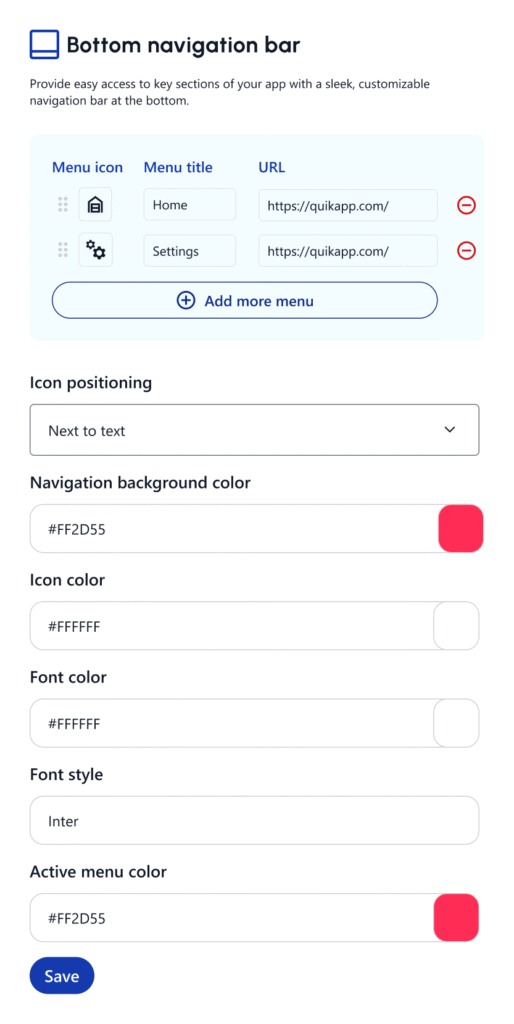
The Bottom Navigation Bar allows you to give users quick access to key sections of your app — similar to popular apps like Instagram or YouTube. With QuikApp, you can fully customize your bottom nav to match your app’s flow and branding.
Navigation Items
Add up to 5 tabs (recommended: 3–5)
Icons
Choose from Quikapp’s icon library Or upload your own SVG/PNG icons. Recommended size: 24x24px (vector preferred)
Labels
Optional text labels under icons. Fully editable (e.g., “Home,” “Cart,” “Account”)
Colors & Style
Set icon and label color (active/inactive). Background color of the nav bar. Choose between flat or elevated style.
How to Enable Bottom Navigation
Go to your App Dashboard. Click on Customization > Bottom Navigation Bar. Toggle on Bottom Navigation. Click “+ Add Tab” to configure items. Save and Preview the app in real-time.