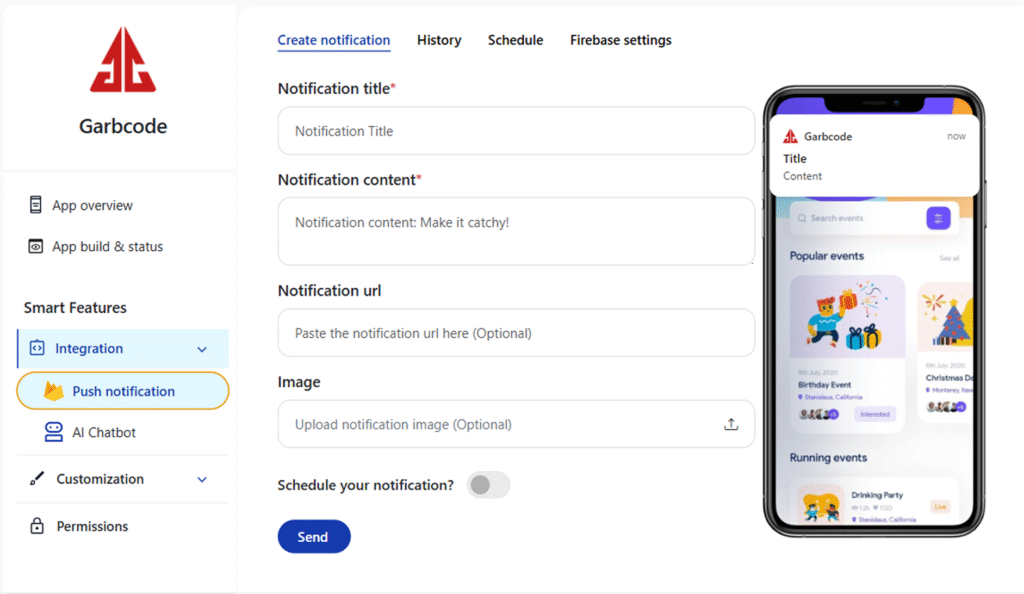
How to send / create push notification
To send and schedule push notification to your users from Quikapp follow the steps given below:
- Login to Quikapp account and go to push notification on the left panel. Go to create notification tab.
- Select the app from the dropdown that you want to send the notification.
- Enter the title of the notification in the notification title field.
- Enter the content of the notification on the notification content field.
- Upload the image (optional) of the notification.
- Next, select the device that you want to send the notification. Android, Ios or Both.
- Click on send now if you want to send the notification right away.
- If you want to send the notification later. You can set the date (DD/MM/YYYY) and time (Min / Hr/ AM or PM) below the schedule notification section.
- Click on Done.
- You can check your scheduled notification under the schedule tab.